A very simple webserver
//Install express and use in app
var express = require("express");
var app = express();

//Seed Data as json
const data = require("./data.json");

//get request for data.json from main page
app.get("/", function (req, res) {
    res.send(data);
});

//Go Live with Server
app.listen("1234", function () {
  console.log("running:  http://localhost:1234/");
});
Output:
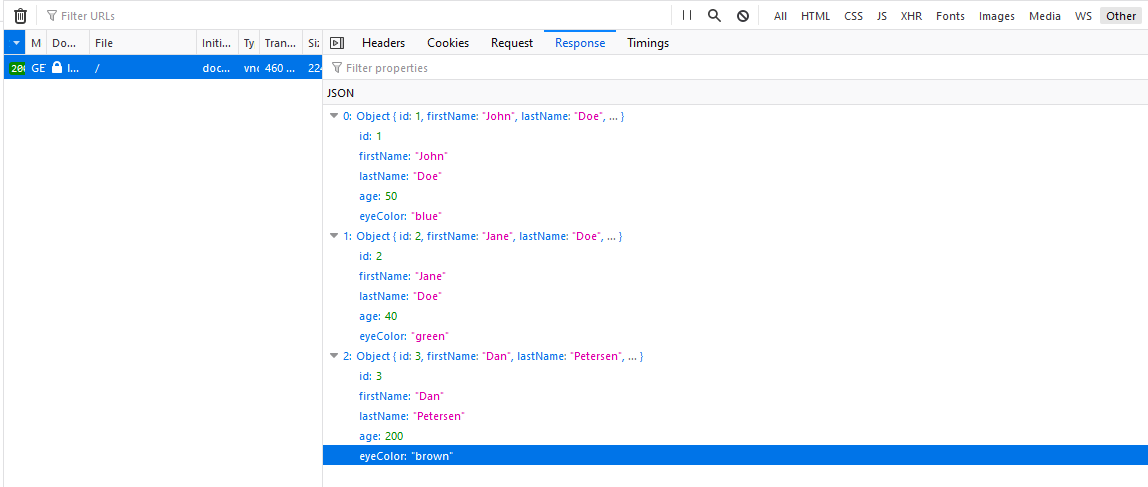
Most of the functionality we covered in yesterday’s post about the setup and config. But here we actually set up the API.
//Install express and use in app
var express = require("express");
var app = express();

const data = require("./data.json");
This is all set up, installing express, initiating it in the app, then pulling in seed data.
The last thing we want to do is set up the server to await requests. It’s best to install nodemon as a dev dependency, this will add it to the package.json file.
npm install nodemon --save-dev
The server is live:
//Go Live with Server
app.listen("1234", function () {
  console.log("running:  http://localhost:1234/");
});
But how does the server respond after a request is made?
//get request for data.json
app.get("/", function (req, res) {
  res.json(data);
});
This simply says, when a get request is made, send the variable ‘data’, which we previously said was a seed data file.