.find() a very useful method for Arrays
Take this code:
const array = [
  {
    id: 1,
    firstName: "John",
    lastName: "Doe",
    age: 50,
    eyeColor: "blue",
  },
  {
    id: 2,
    firstName: "Jane",
    lastName: "Doe",
    age: 40,
    eyeColor: "green",
  },
  {
    id: 3,
    firstName: "Dan",
    lastName: "Petersen",
    age: 200,
    eyeColor: "brown",
  },
];

const record = array.find(({ id }) => id === 3);
console.log(record);

/* output {
  id: 3,
  firstName: 'Dan',
  lastName: 'Petersen',
  age: 200,
  eyeColor: 'brown'
} */
There are quite a few things going on here the trained eye overlooks. Let’s break it down.
First, we have an array of objects. An easy way to get the same output would be to just use:
array[2]
This is fine, but you can’t really query the data in said object.
In day-to-day use, you can’t always know the location of the object in question every time, especially if you’re pulling data from the API or Database. Hence an ID above gives immediate access to the object we want. 👍
Lets look at .find() in a bit more detail:
array.find(({ id }) => id === 3)
first, we call the object array. Then we call the find method. You’ll notice the syntax here is similar to the syntax for an object ie. in the example above
console.log(record.firstname); //'Dan'
This is because the method is on the Array prototype. I’ll cover this in a future post.
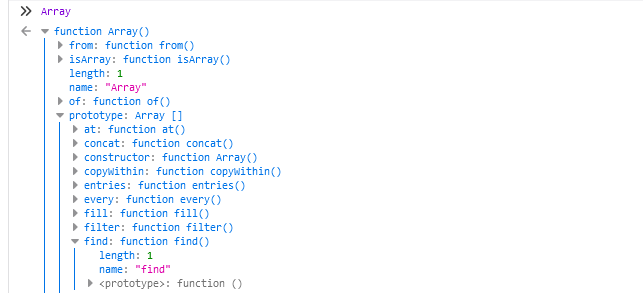
Next, we pass in a function (arrow function to make things read a little nicer).
Then we destructure the object to get the ID. More info here:
https://developer.mozilla.org/en-US/docs/Web/JavaScript/Reference/Operators/Destructuring_assignment
Then we run a check on the ID values ‘=== 3’ if true then return the object.